Showing posts with label SQL Server 2008. Show all posts

Thursday, November 20, 2014

Yikes - A read query is blocking everything!

This is something I saw in an OLTP database with an application (.NET) read query scanning a multi-billion row table while holding a full table S lock. The query thought it was using the default isolation level of read committed. Almost every other query in the system was locked in a chain behind this read query as all update queries on the table (arguably the most important table in this OLTP application) also prevented any other read queries from jumping the queue and had them waiting for a lock too.

By default, SQL Server read queries will use a locking isolation level of READ COMMITTED. Most developers just assume this and, understandably, do not bother to set isolation level. With READ COMMITTED, a read query will only lock the current record while scanning many rows. It has an "intent" lock on the table, which is compatible with all other "intent" locks on the table. However, if you are using connection pooling, which most applications do nowadays, it is possible that your query has picked up an isolation level of REPEATABLE READ from a recycled connection. This is quite serious. Now your query won't release locks as it scans through rows, and once it has read a few thousand rows, it will stop taking row/page locks and lock the entire table.  This is called Lock Escalation, as you have taken so many locks on one object, SQL Server says, "that's enough you may as well have one lock on the entire table". Now it gets interesting. Any INSERT, UPDATE, or DELETE query will have to wait on your query, since they are incompatible with your S (share) lock on the table. What happens next is even more interesting (in a nefarious kind of way). All subsequent read queries (except NOLOCK read queries) will wait for a lock too.  They are compatible with the full read lock but they are incompatible with the IX locks of the insert, update, delete queries, so they must wait in queue. I call this the "no queue jumping" rule.

How exactly does your query get a REPEATABLE READ isolation level when it didn't ask for it? The answer is connection pooling. An application program can change the isolation level of the connection and leave the changed isolation on the released connection. The next thread to pick up the connection will have the isolation level left behind. Many people have raised this issue before and there has been a Connect issue supported by many developers.
http://connect.microsoft.com/SQLServer/feedbackdetail/view/243527/sp-reset-connection-doesnt-reset-isolation-level
Unfortunately, I feel, Microsoft's response has been to close the "Bug" with an "as By Design" flag!

So what can we do to avoid queries escalating to full table locks when they assume isolation of READ COMMITTED?
  1. The cleanest solution would be for the connection pool to pass on used connections with their default settings. This is unlikely to happen in the near future as indicated above by Microsoft. 
  2. Yould could disable connection pooling. This is quite heavy handed and you will pay for it in a slower application as new connections generally take 100's of milliseconds to create.
  3. In your application that uses connection pooling, ensure that all connections are reset to the default isolation level before release. Note, sp_reset_connection does not do this. Also note, there might be times when a piece of code does not follow this standard. Unfortunately, the non standard code won't be affected.  It will be the innocent code that takes on the connection that initiates the locking issue.  
  4. In your application that uses connection pooling, ensure that all new connections are set to the desired isolation level. Ie, don't rely on a new connection having the default settings. This is probably a good practice, as all code that follows this standard will be OK.
  5. Use WITH (NOLOCK) table hint on your read queries. This will certainly avoid the lock escalation. However, there can be interesting data integrity issues in reading with no locks, such as reading the same row twice. I think there is a place for NOLOCK, but I wouldn't advise the use NOLOCK throughout your application. The problem is the use of REPEATABLE READ not READ COMMITTED.
  6. Use WITH (READCOMMITTED) table hint on your read queries. This will override REPEATABLE READ isolation level on the connection for this table. So the problem above is avoided, but it is a bit of a task changing all the queries to use this table hint. Note, query hints have a bad rap, which is understandable when they override the optimizer's choice of access path. I see no problem with query hints when they are requesting a specific isolation level.
  7. Use READ COMMITTED SNAPSHOT ISOLATION on your database. This is not a solution as the read query is on a connection that has a REPEATABLE READ isolation. As the name suggests, READ COMMITTED SNAPSHOT ISOLATION only works on connections that are using READ COMMITTED
  8. Use TRANSACTION COMMITTED SNAPSHOT ISOLATION on your database. This is not a solution either, as it does not override the REPEATABLE READ isolation level of the read query.
  9. Wait for upgrade to SQL Server 2014.  It looks like the isolation levels are reset on pooled connections.  However, you should check, as this information has simply be posted in an msdn forum, albeit from a SQL team member. 
How can I determine if REPEATABLE READ is being used by my application?
  • A SQL Server Profiler trace on ExistingConnection events will provide the isolation level of all active connections. Just look for set transaction isolation level and see what follows. If any of your current connections have REPEATABLE READ you should be concerned. ExistingConnection will only display currently active connections. To see if isolation level is changed, you will need to trace SQL:BatchCompleted and SP:StmtCompleted, and Prepare SQL. Looking for the text '%set%transaction%isolation%level%repeatable%read%'.
  • Another useful Profiler trace is to trace Lock:Escalation. I believe that any table lock escalation in your OLTP environment should be of some concern to you, particularly if you have locking or deadlock issues. However, if you have too many to look at, you could filter in/out by Type=5 (Object), objectId (table) and/or Mode=3 (S-share).
How lucky are we? There are two ways of viewing the locking incident.

  1. Unfortunate that it happened and get a quick fix asap for this particular query.
  2. Fortunate that this relatively small incident occurred, which enabled us to uncover something quite serious (full table locks in an OLTP environment). The issue, has given us an opportunity to discover the dynamics of connection pooling and helping us find an application wide fix to prevent its future occurrence. Also, if there is a future locking incident, we have more knowledge to diagnose that too. I see this as analogous to someone having high blood pressure and going to the doctor for a fix.  The high blood pressure could be seen as annoying and simply needing some pills to lower the blood pressure, or it could be an opportunity of determining the cause of the high blood pressure (be it diet, stress, etc.) and rectifying the underlying cause.





Saturday, June 25, 2011

Single Click SQL Management Studio


Here is a simple way to avoid clicking on the inevitable SQL prompt when starting SQL Server Management studio.
On the shortcut simple add -S -d -E

For eample, on my PC, the shortcut is
"C:\Program Files (x86)\Microsoft SQL Server\100\Tools\Binn\VSShell\Common7\IDE\Ssms.exe" -S Manly -d master -E


Now when you click on SQL Server Management studio, it will connect automatically to the server/dbname. No more prompts to the server/dbname that you connect to every day.

Monday, July 19, 2010

VARCHAR(MAX) Performance in SQL Server 2008 R2

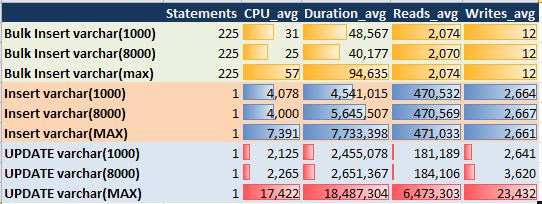
There has been some discussion around the relative performance of VARCHAR(MAX) versus VARCHAR(n) columns. I thought it would be useful to benchmark the performance of INSERT, UPDATE and BULK INSERT of these datatypes.

Essentially, I found that there is a performance cost to using VARCHAR(MAX) over VARCHAR(8000). This would suggest that you should only use VARCHAR(MAX) when you need to. (Ie you have data that can be longer than 8000 bytes.) I would add to this by saying that data types should always be as tight as practical. It would not be a good practice to make all varchar data types MAX. For example, if you application has a screen that only permits 30 characters, it would make sense to make the data type VARCHAR(30). Although, I could make exceptions if I thought this might be increased in future.

Notice; in the results of my test that INSERT and BULK INSERT are only penalised by cpu. UPDATE statements appear are penalised by reads and writes too. Consequently, inserts were only slower by a factor of 2, while updates were slower by a factor of 7. All tests were inserting or updating 110,879 rows taking 42MB. Compression was not used.

Monday, June 28, 2010

Easy Tuning Options for SQL Server OLTP

Even though I have specialised in business intelligence applications, I still help customers with OLTP performance issues. Here are a couple of very simple option that can make quite a difference without changing any code.

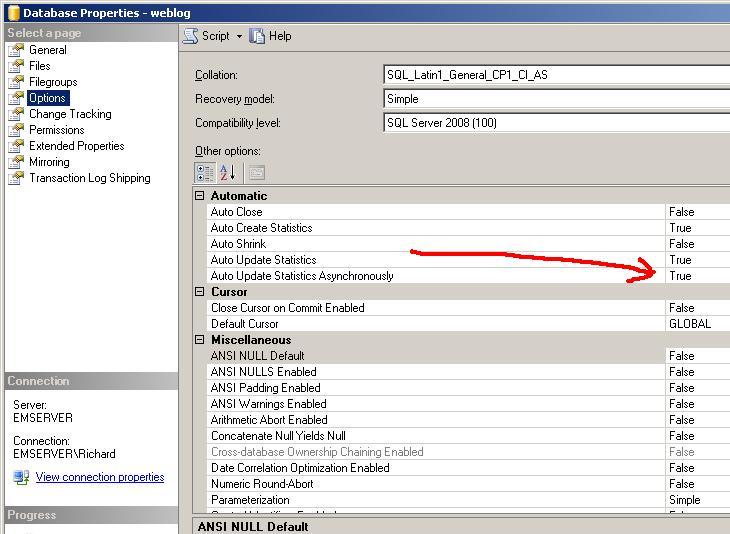
  1. Turn on asynchronous statistics collection. This can be a great help where there are locking (and/or deadlocking) because you want to reduce the duration of transactions. The probability of deadlock tends to be exponentially proportional to the transaction duration. Asynchronous statistics collection will enable your transactions to continue to execute without having to wait for the statistics gathering. By the way, if you really want to manage statistics in a critically high tp system, you might want to disable autostats and run them on a schedule off peak. This option is set for the server on the advanced properties tab.

  2. Disable query decomposition. In an OLTP system, you really don't want one query to break up into many parallel tasks consuming more resources. The property is "Max Degree of Parallelism" and is set by database.

Of course there are a million things that you can do differently in your application to make it perform better, but I would need to write a book to cover the essentials. Also, hardware is always an option to improve performance, but it will only improve performance if it is hardware that is a critical resource.

For real time BI and data mining demonstrations see http://RichardLees.com.au/Sites/Demonstrations


Friday, January 15, 2010

Are Temp Tables Bad?

I have often said that temp tables are the hallmark of sloppy SQL programmers. Why can't these developers write correlated subqueries with outer joins without writing out intermediate tables? I even had a little wager for a bottle of whisky with Ron Soukup about the merits of temp tables just after I joined Microsoft in 1995. That was before I knew who Ron was. I was to show that a query could be faster without temp tables, but the old SQL Server 6.5 optimiser was didn't make it easy for me. Essentially, if you are using a temp table, you are saying that you can do it better than the database optimiser. Or in other words, the optimiser has room for improvement.

However, a colleague has brought to my attention a query that reliably runs faster with a temp table, and there isn't much I can do about it.

It would appear that SQL Server's optimiser uses the estimated rowcount when setting up/executing a sort. So that if the estimated rowcount is much higher than the actual, the sort becomes slightly more expensive than the same sort with an accurate estimation. This is quite intuitive to me, since a very large sort might use a different algorithm than a very small sort. (In the old mainframe days we always had to tell the sort program how many records it was going to sort.)

In my query without a temp table, SQL Server estimates 26,000 rows will be sorted, while the actual number of rows to be sorted is 36. Of course the sort after the temp table quite accurately estimates 36 rows. So, by inserting the 36 rows into a temp table before sorting, the optimiser will know quite accurately how many records it will sort. To further support this hypothesis, I included a "top 36" in the query without a temp table, and low and behold, it estimated 36 rows in the sort and ran faster (in the same time as the temp table query).

I feel that this performance effect is more of a curiosity than a valid justification to use temp tables in queries with Order By clauses. Also, it is very likely that in a future version of SQL Server the Optimiser team will enhance the product to dynamically determine what sort will be employed during query execution. Then the temp table query will be slower.

The original query was from a customer database, but here is an equivalent query that I have written on my home Perfmon database. If you want to reproduce the effect, the key is to have a query that estimates a very large number of rows in the sort, while the actual number is very small.

The picture shows the execution plan for the two queries. The first query (no temp table) took 53% of the total resources, while the second and third queries (with temp table) only used 47% of the total resources. This was further evidenced from the temp table queries using 10% less cpu than the original query. 328 ms of cpu versus 297 ms for the temp table queries.

DECLARE @date DATETIME
DECLARE @value real
select @date = '2010-01-15 15:50:00', @value = 700

--select * from (
select --top 53
MAX(CounterDateTime) CounterDateTime,
SUM(CounterID) CounterID,
CounterValue CounterValue
FROM CounterDatafacts with (nolock)
WHERE CounterValue between @value and @value+2
and CounterDateTime between @date and DATEADD(hh,1,@date)
Group By CounterValue --) as x
ORDER BY CounterDateTime
--Same query query using temp table
select MAX(CounterDateTime) CounterDateTime,
SUM(CounterID) CounterID,
CounterValue CounterValue
INTO #TEMP
FROM CounterDatafacts with (nolock)
WHERE CounterValue between @value and @value+2
and CounterDateTime between @date and DATEADD(hh,1,@date)
Group By CounterValue
SELECT * FROM #TEMP ORDER BY CounterDateTime

DROP TABLE #Temp

Thursday, November 26, 2009

When to use clustered indexes

I often found experienced database designers, new to SQL Server, will come with preconceived ideas about the optimiser and storage engine. One of these ideas is that clustered indexes should be used sparingly, since they come at a cost with limited benefit. With SQL Server, this is by and large untrue, and as a general rule, most tables will be better off with one of the indexes being clustered.

SQL Server (and Sybase) have historically had a structurally different way of maintaining clustered indexes. They actually use the index leaf pages to hold the data columns, which enables them to save space, reduce the number of pages touched in an index path, and use them to very efficiently sequence scan.

There is a useful performance analysis of clustered versus non-clustered PK index on http://technet.microsoft.com/en-us/library/cc917672.aspx This paper looks primarily at the cost and throughput of inserts, updates and deletes. By and large, the clustered indexes performed better. There is one significant exception, where there are high volume concurrent inserts, with keys in close proximity. In this situation, concurrent can compete for locks and latches with other active transactions with similar keys. By the way, this does not necessarily mean that you shouldn't use a clustered index for the table, rather, it might mean your clustered index should be on a key that won't create hot spots. For example tbTransaction might have contention with TransactionID clustered, but a clustered index on AccountID would be less contentious and might even be better serving queries.

One area that this paper doesn't look at, and in my view, is one of the most important reasons for clustering, is queries that join very large tables. If you are joining two or more very large tables, the optimiser will like to have the opportunity to Merge Join the larger tables. For example, a query that was to join tbTransaction with tbTransactionCharges and many other smaller tables is likely to benefit from having both large tables clustered in the same sequence. This could be TransactionId, or, perhaps more likely, AccountID. If queries on these two tables were often filtered by particular accounts (or tbAccount columns) then having all 3 tables clustered by AccountID (and also TransactionID or TransactionDate for the transaction tables) is likely to provide very good join performance.

We are very fortunate with relational databases, in that we can change the index structure without having to rewrite any application queries. However, I would encourage database designers to analyse in some detail the activity on the biggest tables, and design appropriate clustered indexes early on. Clustereed indexes are much more difficult to change at a later date than non clustered indexes. Also, for those smaller tables, make one of the indexes (typically the natural primary key) clustered.

For a real-time demonstration of a database application continuously processing about 300 records/sec see http://RichardLees.com.au/Sites/Demonstrations The Perfmon application is close to real-time and is processing about 300 perfmon records all day, every day, on commodity 32 bit (yes I really should upgrade) hardware.

Tuesday, November 24, 2009

How to Avoid SQL Reserved Words

Have you ever been querying a database and received a syntax error because one of your column, table or some other object name is clashing with an SQL reserved word? If so, here is an easy way to avoid reserved words during your development cycle. In simple terms it joins a list of reserved words with your catalog columns.

  1. Simply download the ReservedWords.csv from http://richardlees.com.au:8080/dropzone/SQLReservedWords.csv Or if you prefer, copy the words from SQL Server books online and load them into a table.
  2. Load the words into this table
    create table ReservedWords (ReservedWord varchar(128), ReserveWordList varchar(128))
  3. Run the following query

select o.name [Object Name],c.name [Column Name], w.ReserveWordList
from sys.columns c
inner join coreddsdevtemp..ReservedWords w on w.ReservedWord=c.[name]
inner join sys.objects o on c.object_id=o.object_id and o.type NOT IN ('S','IT')
order by 1,2

You will get a list of all the objects that have column names on the SQL 2008, ODBC, and SQL future reserved lists. By the way, you might want to filter out the ODBC words if they are not appropriate for you.

I should add that it isn't fatal to have reserved words in your columns. It just means that you might have to use delimiters around your column names.

Wednesday, July 22, 2009

Instant File Initialization for SQL Server 2008 (and 2005)

I will do anything to reduce the IO load on large databases, which is why I am a great fan of compression in SQL Server 2008. However, another way of reducing IO is to ask SQL Server to format new data extents without writing zeroes out to all pages. If your database takes a new extent (by default it is 10% of the file size, which typically isn't good) SQL Server will want to write binary zeroes to all the pages to ensure that some old data isn't hidden in your database. SQL Server does not need the binary zeroes, it is done to ensure data security. Someone else may have deleted a file and perhaps they don’t not want you seeing the data.

Very often, the data security is not an issue and you would like to avoid the writing of binary zeroes. This can be achieved (on NTFS drives) by ensuring that the account running SQL Server has SE_MANAGE_VOLUME_NAME privilege. You can grant this privilege in User Rights Assignment on Windows 2003, XP or above. To do this, grant the SQL Service account Perform volume maintenance tasks local security rights. Alternatively, if the SQL service account has administrator privileges, it will automatically have this privilege. That's all you need to do to avoid having SQL Server write all those binary zeros. By the way, SQL Server always needs to write binary zeroes to the log files, we are only avoiding binary zeroes on the data files.

If you don't want to grant this privilege to the SQL service account, and you want to avoid the IO load during peak times, I suggest that you extend (manually or automatically) your datasets during an off peak times (i.e. before SQL does it for you).

One of the most noticeable tasks affected by binary zeros is database restores. If you watch the restore progress, it will typically not move off 0% until it has written out the entire data files with binary zeroes. After writing every data page, it will then write the backup files over the data pages, during which time, you will see the progress percent increase. So writing binary zeroes can approximately double full database restore times.

Hope that helps you reduce IO load and increase SQL Server performance.

For real-time SQL demonstrations, including Perfmon, which is writing over 300 records every second, see http://RichardLees.com.au/Sites/Demonstrations