I had the pleasure of working with my favourite Mexican restaurant chain, Guzman Y Gomez. Their tacos are amazing. I like to think that I helped them in a small way by allowing them to report and analyse combined data close to real time.
Guzman Y Gomez - business intelligence case study.

Showing posts with label Business Intelligence. Show all posts
Showing posts with label Business Intelligence. Show all posts
Sunday, January 12, 2020


Saturday, December 28, 2019
Getting data from the cloud using SSIS
So much of our source data is now in the cloud. We need to continually extract it for our Business Intelligence solutions. Unfortunately, these cloud providers tend not to offer database connections for extracting data. However, it's not too difficult, using SSIS, to script an object as a source for an SSIS Data Flow.
There are some challenges extracting cloud data
 What I have found fruitful, is to break the http response into data records that go straight into a staging database. No data typing at this stage. The staging database can be queried with IsJSON() and JSON_Value() to populate the data warehouse. Only a small amount of code is required to perform the conversion of JSON to datatyped columns ready for loading. There is no need for the added complexity and fragility of extracting to flat files.

There are some challenges extracting cloud data
- Every cloud provider has it's own way of authenticating (certificates, userid/password, token in https header etc).
- Each provider has it's own way of paging through or filtering data.
- Data types are not guaranteed.
- Column names (attributes) are self defining
However, using the WebClient object, we can write a little code and get the JSON record passed back to the SSIS data flow. JSON is the most popular data structure, which can be handled natively within SQL Server with SQL JSON functions (IsJSON, JSON_Value, JSON_Query).
 What I have found fruitful, is to break the http response into data records that go straight into a staging database. No data typing at this stage. The staging database can be queried with IsJSON() and JSON_Value() to populate the data warehouse. Only a small amount of code is required to perform the conversion of JSON to datatyped columns ready for loading. There is no need for the added complexity and fragility of extracting to flat files.
Here is some very simple vb code to download records that uses the https header to authenticate. "{""id"":" identifies the start of a new record for this provider. Note, the https url will typically be parameterised to include filters etc from SSIS control flow. MyOutputBuffer is the name of the output defined on the script source object (see below). The actual name is "MyOutput", "Buffer" is added by SSIS. In this case, I have defined one column in the output called JSONRecord as a string with length of 8000.
So, while it is not as simple as a database connection, it is not complicated and in my experience it is reliable. As always, I encourage defensive programming, so that if a connection or task is broken/unavailable, at any time, the next time the job starts it will automatically continue from where it left off.
Public Overrides Sub
CreateNewOutputRows()
Using client2 As New Net.WebClient
client2.Headers.Add("Authorization: bla bla bla")
client2.Headers.Add("Content-Type: application/json")
sInputBuffer =
client2.DownloadString("https://myCloudProvider.com")
End Using
Dim sInputBuffer As String
Dim sJSONRecord As String
Dim iEnd As Int32
Dim iStart As Int32
iStart = InStr(sInputBuffer, "{""id"":")
While iStart > 0
iEnd = InStr(20, sInputBuffer, "{""id"":") - 1
If iEnd > 0 Then
sJSONRecord = Mid(sInputBuffer,
iStart, iEnd - iStart)
sInputBuffer =
Mid(sInputBuffer, iEnd, 999999)
Else
sJSONRecord = Mid(sInputBuffer,
iStart, 9999)
sInputBuffer = ""
End If
With MyOutputBuffer
.AddRow()
.JSONRecord= sJSONRecord
End With
iStart = InStr(sInputBuffer, "{""id"":")
End While
End Sub
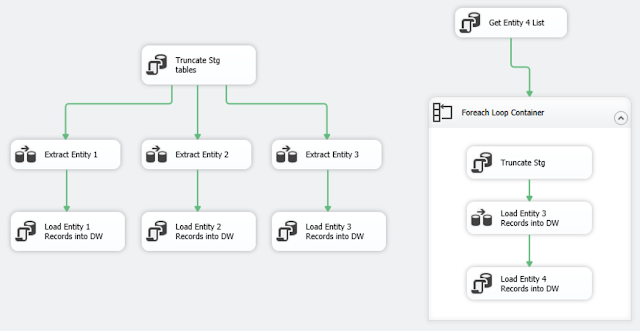
The example below has four entities (tables) extracted from the cloud. The fourth one is iterative as it must call for a set of records for each of another entity.


Subscribe to:
Posts (Atom)
